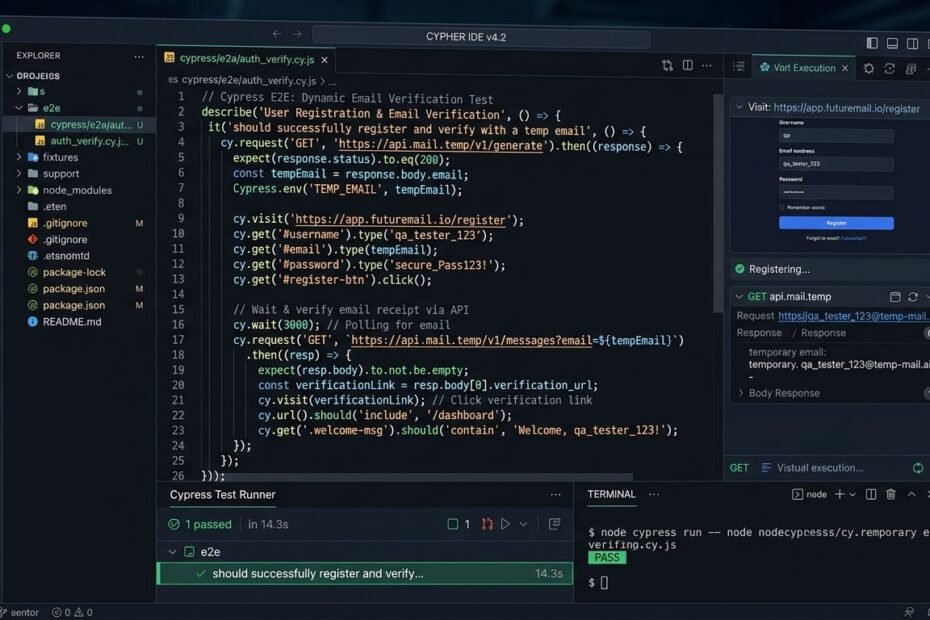
In modern web application development, user registration and onboarding user flows represent mission-critical paths. If a new user cannot successfully register an account, receive a verification email, click an activation link, or input a One-Time Password (OTP), your application suffers immediate user drop-off and lost revenue. Consequently, Quality Assurance (QA) engineers and DevOps teams must execute rigorous End-to-End (E2E) automated test suites on every code deployment.
However, testing email verification workflows programmatically presents severe technical bottlenecks. Using real static webmail accounts (such as Gmail or Outlook accounts via IMAP) rapidly triggers anti-spam rate limits, IP blocks, and test worker race conditions. In this technical developer guide, we explore how engineers leverage dynamic disposable temp mail endpoints like TempMail.asia to automate signup verification testing seamlessly across Cypress, Playwright, and Selenium test frameworks.
The Flaws of Legacy Automated Email Testing Methods
Before adopting disposable mail APIs, engineering teams traditionally relied on legacy approaches to verify registration emails. Here is why those legacy methods consistently fail in modern continuous delivery (CI/CD) pipelines:
1. Shared Static IMAP Inbox Bottlenecks
Many testing suites configure a single dedicated testing email account (e.g., qa_testing@example.com) accessed via IMAP protocol. When multiple test workers execute in parallel inside a CI server (such as GitHub Actions or Jenkins), multiple test runners attempt to query, read, and delete messages simultaneously. This introduces severe race conditions, causing test suites to fail intermittently (flakiness).
2. Vendor Rate Limits & Anti-Spam CAPTCHAs
Major commercial webmail providers (Google Gmail, Microsoft Outlook, Yahoo) enforce strict automated access rate limits. When a test suite dispatches hundreds of automated registration emails per hour from a test server IP address, webmail providers trigger CAPTCHAs, flag test accounts, or block incoming Simple Mail Transfer Protocol (SMTP) traffic entirely.
3. Manual Database & Inbox Cleanup Overhead
Using static test mailboxes requires developers to author complex post-test teardown scripts to purge accumulated emails and database records after every test run. If a test runner crashes mid-execution, orphaned test messages clutter the inbox, causing false positives in subsequent test runs.
The Disposable Temp Mail Automation Paradigm
Modern E2E testing frameworks eliminate flakiness by programmatically instantiating dynamic, isolated temporary mailboxes per test run. By leveraging volatile temporary mail endpoints like TempMail.asia, every automated test worker receives a dedicated inbox that accepts incoming verification payloads instantly and auto-purges after test teardown.
End-to-End Test Execution Sequence Diagram
+-------------------+        +-------------------+        +-------------------+        +-------------------+
|  Automated Test   |        |  Web App (SaaS)   |        |  Mail Server (MX) |        | TempMail.asia API |
|   Runner (QA)     |        |   Signup Form     |        |  Mail Dispatcher  |        |  Inbox Buffer     |
+---------+---------+        +---------+---------+        +---------+---------+        +---------+---------+
          |                            |                            |                            |
          |  1. Generate Unique Mail   |                            |                            |
          |----(test_8492@tempmail)--->|                            |                            |
          |                            |                            |                            |
          |  2. Submit Registration    |                            |                            |
          |--------------------------->|                            |                            |
          |                            |  3. Dispatch Verification  |                            |
          |                            |--------(SMTP Email)------->|                            |
          |                            |                            |  4. Ingest & Sanitize Payload
          |                            |                            |--------------------------->|
          |                            |                            |                            |
          |  5. Poll Inbox via API     |                            |                            |
          |------------------------------------------------------------------------------------->|
          |  6. Return OTP / Activation Link                        |                            |
          |<-------------------------------------------------------------------------------------|
          |                            |                            |                            |
          |  7. Submit OTP / Click Link|                            |                            |
          |--------------------------->|                            |                            |
          |                            |                            |                            |
          |  8. Assert Signup Success  |                            |                            |
          |  (Dashboard Rendered)      |                            |                            |
          v                            v                            v                            v
Automated Code Examples Across Modern Test Frameworks
Example 1: Playwright (TypeScript / Node.js) Integration
Playwright is a modern framework for reliable end-to-end testing. The TypeScript example below demonstrates generating a dynamic temporary email, submitting a signup form, polling the inbox via HTTP request, extracting a 6-digit OTP code, and completing account verification:
import { test, expect } from '@playwright/test';
import axios from 'axios';

test.describe('Automated Account Onboarding Suite', () => {

    test('User successfully registers and verifies email OTP via Temp Mail API', async ({ page }) => {
        // Step 1: Generate dynamic worker-isolated email address
        const uniqueId = Date.now();
        const tempEmail = `qa_worker_${uniqueId}@tempmail.asia`;
        const userPassword = 'ComplexTestPassword2026!';

        // Step 2: Navigate to signup page and submit form
        await page.goto('https://app.example.com/register');
        await page.fill('input[name="fullname"]', 'QA Test Runner');
        await page.fill('input[name="email"]', tempEmail);
        await page.fill('input[name="password"]', userPassword);
        await page.click('button[type="submit"]');

        // Step 3: Assert UI prompts for OTP code
        await expect(page.locator('.otp-sent-banner')).toBeVisible();

        // Step 4: Poll Temp Mail API endpoint for incoming OTP message
        let otpCode = null;
        const maxRetries = 10;

        for (let i = 0; i < maxRetries; i++) {
            await page.waitForTimeout(2000); // Poll every 2 seconds

            try {
                const apiResponse = await axios.get(`https://tempmail.asia/api/v1/inbox/${tempEmail}`);
                if (apiResponse.data && apiResponse.data.messages.length > 0) {
                    const messageBody = apiResponse.data.messages[0].body;
                    // Extract 6-digit verification OTP using Regex
                    const match = messageBody.match(/\b\d{6}\b/);
                    if (match) {
                        otpCode = match[0];
                        break;
                    }
                }
            } catch (error) {
                console.log(`Polling inbox... Attempt ${i + 1}/${maxRetries}`);
            }
        }

        // Verify OTP was retrieved successfully
        expect(otpCode).not.toBeNull();

        // Step 5: Input OTP into web application form
        await page.fill('input[name="otp_code"]', otpCode);
        await page.click('button#verify-otp-btn');

        // Step 6: Assert user successfully redirected to dashboard
        await expect(page).toHaveURL('https://app.example.com/dashboard');
        await expect(page.locator('.welcome-heading')).toContainText('Welcome, QA Test Runner');
    });
});
Example 2: Cypress.js (JavaScript) Integration
Cypress provides built-in commands to handle API requests alongside DOM interactions. The example below shows how to extract an activation link from an incoming HTML email body and navigate directly to confirm registration:
// Cypress Integration Example: Activation Link Extraction
describe('Registration Activation Flow', () => {
    it('Extracts activation link from temporary inbox and confirms account', () => {
        const timestamp = Date.now();
        const testEmail = `cypress_qa_${timestamp}@tempmail.asia`;

        // 1. Visit signup portal and register
        cy.visit('https://app.example.com/signup');
        cy.get('#user-email').type(testEmail);
        cy.get('#submit-registration').click();

        // 2. Poll Temp Mail API for confirmation email
        cy.waitUntil(() => {
            return cy.request({
                method: 'GET',
                url: `https://tempmail.asia/api/v1/inbox/${testEmail}`,
                failOnStatusCode: false
            }).then((res) => {
                return res.status === 200 && res.body.messages.length > 0;
            });
        }, { timeout: 15000, interval: 2000 });

        // 3. Extract activation URL from message body
        cy.request(`https://tempmail.asia/api/v1/inbox/${testEmail}`).then((res) => {
            const htmlContent = res.body.messages[0].html_body;
            // Parse href activation link using Regex pattern
            const activationLink = htmlContent.match(/href="(https:\/\/app\.example\.com\/activate\?[^"]+)"/)[1];

            // 4. Visit activation link directly
            cy.visit(activationLink);
            cy.contains('Your account has been verified successfully!').should('be.visible');
        });
    });
});
Example 3: Python (Selenium + Requests) Integration
Python developers utilizing Selenium WebDriver alongside the requests library can implement robust verification polling with error handling:
# Python Selenium E2E Signup Test Example
import time
import re
import requests
from selenium import webdriver
from selenium.webdriver.common.by import By

def run_signup_test():
    # 1. Initialize WebDriver and dynamic email string
    driver = webdriver.Chrome()
    unique_id = int(time.time())
    test_email = f"python_qa_{unique_id}@tempmail.asia"

    try:
        # 2. Navigate to application signup page
        driver.get("https://app.example.com/signup")
        driver.find_element(By.NAME, "email").send_keys(test_email)
        driver.find_element(By.ID, "submit-btn").click()

        # 3. Poll Temp Mail REST API for incoming message
        otp_code = None
        for attempt in range(10):
            time.sleep(2)
            api_url = f"https://tempmail.asia/api/v1/inbox/{test_email}"
            response = requests.get(api_url)

            if response.status_code == 200:
                data = response.json()
                if data.get("messages"):
                    message_text = data["messages"][0]["text_body"]
                    # Extract 6-digit numerical code
                    otp_code = re.search(r'\b\d{6}\b', message_text).group(0)
                    break

        assert otp_code is not None, "Failed to retrieve OTP code within timeout"

        # 4. Input OTP into application UI
        driver.find_element(By.NAME, "otp_input").send_keys(otp_code)
        driver.find_element(By.ID, "verify-btn").click()

        # 5. Assert dashboard navigation
        time.sleep(1)
        assert "dashboard" in driver.current_url
        print("Test Passed: Account created and verified successfully!")

    finally:
        driver.quit()

if __name__ == "__main__":
    run_signup_test()
Integrating Temp Mail Testing into GitHub Actions CI/CD Pipeline
Automated test suites should run on every pull request (PR) inside continuous integration servers. Below is an example GitHub Actions workflow file executing Playwright registration tests in headless mode:
# .github/workflows/e2e-testing.yml
name: E2E Signup Test Pipeline

on:
  push:
    branches: [ main, develop ]
  pull_request:
    branches: [ main ]

jobs:
  e2e-tests:
    runs-on: ubuntu-latest
    steps:
      - name: Checkout Code Repository
        uses: actions/checkout@v3

      - name: Setup Node.js Environment
        uses: actions/setup-node@v3
        with:
          node-version: 18

      - name: Install Dependencies
        run: npm ci

      - name: Install Playwright Browsers
        run: npx playwright install --with-deps

      - name: Execute Playwright E2E Tests
        run: npx playwright test tests/signup.spec.ts
        env:
          CI: true
          TEMPMAIL_API_ENDPOINT: "https://tempmail.asia/api/v1"
Best Practices for Engineering Teams
- Implement Exponential Backoff Polling: When querying the temporary inbox API for incoming messages, poll every 2 seconds with an upper timeout limit of 15–20 seconds to prevent unnecessary server load.
- Isolate Parallel Worker Namespaces: Append process IDs (PID) or thread IDs to temporary email usernames to guarantee zero inbox collisions during parallel execution.
- Sanitize API Secret Tokens: Ensure testing environment keys and staging credentials are stored inside encrypted CI secret vaults rather than hardcoded in source files.
- Log Helpful Diagnostic Output on Failure: If a test fails to receive an email within the timeout window, log the generated email address and API response payload to assist in debugging mail delivery pipelines.
Frequently Asked Questions
Are temporary email inboxes fast enough for automated CI/CD pipelines?
Yes. TempMail.asia routes incoming SMTP messages into memory in sub-second speed, allowing automated test runners to receive verification OTPs and activation links in under 3 seconds.
Do disposable mail test inboxes require manual deletion after testing?
No. Ephemeral test mailboxes self-destruct automatically after session completion, ensuring zero database maintenance or manual inbox purging overhead.
Conclusion
Leveraging disposable temporary email services like TempMail.asia in automated test suites transforms registration testing from a flaky, high-maintenance bottleneck into a fast, reliable, and deterministic process for development teams.